


New Webex App Experience
The new personalized app experience brings your daily brief, priorities, and meeting prep together with AI agents that listen, act, and collaborate across spaces, calls, and meetings. Choose the AI that works best for you and connect to an ecosystem of agents, skills, and integrations that can complete multi-step tasks.

Dialog
Dialog creates a continuous customer relationship by unifying customer and enterprise context, enabling long-horizon, multimodal, self-learning agents to orchestrate complex journeys.

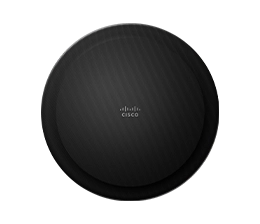
Ceiling Speaker Pro
Bring clear, consistent audio to large meeting rooms with intelligent voice lift and spatial audio distribution—plus rapid AV setup, automatic configuration, and simplified audio over IP.

RoomOS 27
RoomOS 27 brings together the voice-enabled Cisco AI Assistant, enhanced audio, and simpler setup and troubleshooting, so workspaces become more than a place to meet—help move work forward.
20M+ Calling Users Across 200+ Markets
Webex Calling now delivers enterprise-grade calling with a 99.999% SLA to over 20 million users across 200+ markets worldwide.
New Webex App Experience
The new personalized app experience brings your daily brief, priorities, and meeting prep together with AI agents that listen, act, and collaborate across spaces, calls, and meetings. Choose the AI that works best for you and connect to an ecosystem of agents, skills, and integrations that can complete multi-step tasks.

20M+ Calling Users Across 200+ Markets
Webex Calling now delivers enterprise-grade calling with a 99.999% SLA to over 20 million users across 200+ markets worldwide.
Personal Agents for Webex Calling
Personal agents for Webex Calling ensure important calls aren’t missed, even when you’re unavailable. It intelligently screens calls, converses with callers to understand their needs and determine urgency, prioritize what matters most, and takes action on your behalf.
Collaborate with Claude
Bring Claude into Webex spaces, meetings, and calls to work alongside you and your team. Simply add Claude to delegate tasks, ask questions, and get things done together—right where your conversations happen.

Cloud Intelligence for UCM
Cloud Intelligence for UCM delivers AI-powered employees, customer, and administrator experiences to Cisco UCM. It gives businesses a flexible path to modernization that builds on existing UCM investments, reduces costs, and delivers cloud innovation without a forced migration timeline.
AI Agents for Collaboration
AI Agents for Collaboration enable businesses, teams, and individuals to create custom AI agents that understand intent, connect to business systems, and automate workflows across voice, video, and digital interactions. Built in AI Agent Studio through a simple, no-code experience, these agents can be tailored to virtually any workflow or use case.

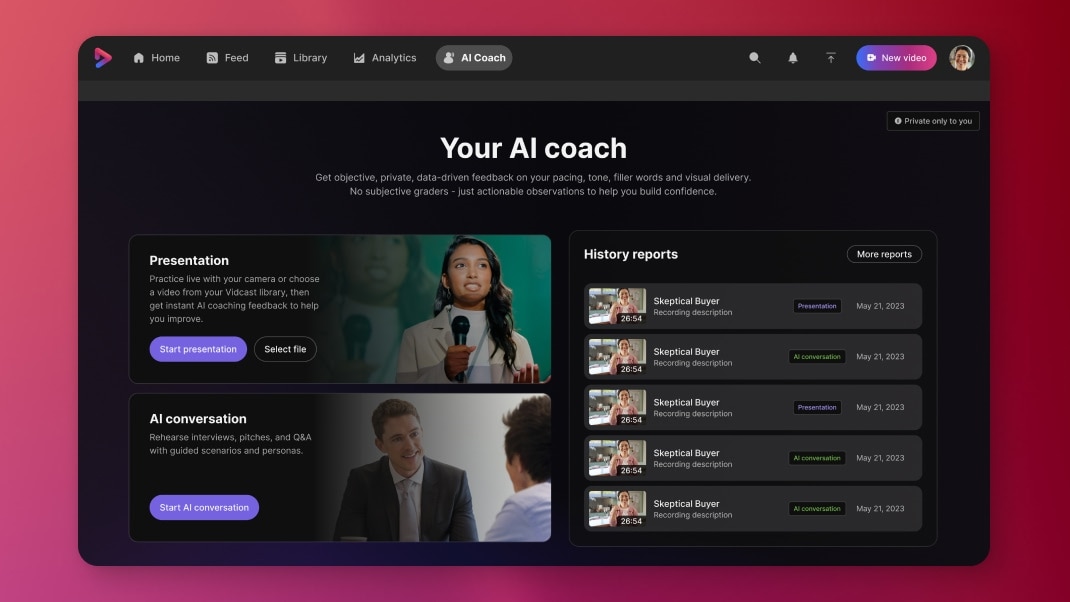
Get objective, private, and data-driven coaching on your pacing, tone, filler words, and visual delivery by practicing live with your camera or choosing a video from your Vidcast library.
Webex Calling and SecureLogix help organizations protect users from malicious calls and establish greater trust in the identities of inbound callers, without on-premises security infrastructure. Organizations can move calling to the cloud while maintaining the enterprise-grade voice security they rely on—strengthening trust across every call.
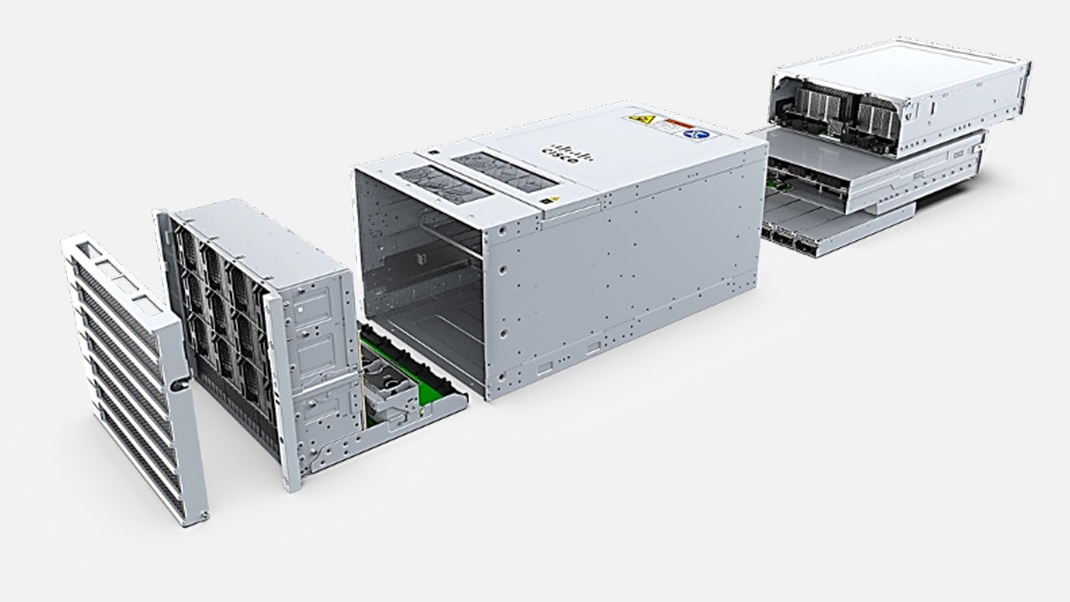
Cisco AI PODs for Collaboration bring fully secure AI innovations to on-premise and hybrid deployments with Cisco AI Defense and Observability. The latest enhancements enable Calling and Contact Center support, on-premises post meeting summaries, and on-premises meeting recordings via Video Mesh.
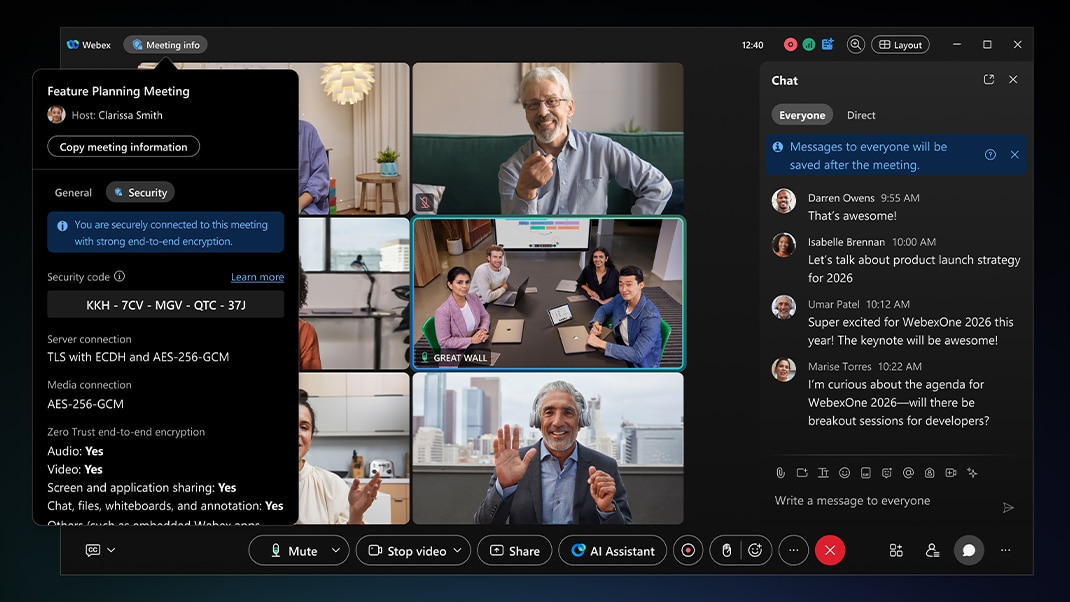
Webex enhancements to Zero-Trust Meetings boost security by providing adaptive Zero Trust and expanded end-to-end encryption support for web browsers and Webex Calling Phones, Zero-Trust Identity, feature-rich Zero-Trust Meetings, and post-quantum collaboration.
Create, update, and manage Jira tickets within the AI Assistant panel instantly, without ever leaving Webex.
Never lose track of a follow-up again. The Webex Task Agent automatically pulls action items from meeting summaries and organizes them in the Task tab.
With the addition of a second data center in India, Webex offers flexible Public Switched Telephone Network (PSTN) connectivity through Cloud Connect partners.
Ceiling Speaker Pro
Bring clear, consistent audio to large meeting rooms with intelligent voice lift and spatial audio distribution—plus rapid AV setup, automatic configuration, and simplified audio over IP.

RoomOS 27
RoomOS 27 brings together the voice-enabled Cisco AI Assistant, enhanced audio, and simpler setup and troubleshooting, so workspaces become more than a place to meet—help move work forward.
RoomOS 27: Cisco AI Assistant
Meet your new interface to the intelligent workplace. The Cisco AI Assistant understands natural language and intent, allowing users to control room amenities, book spaces, and more.

Cisco Devices for Google Meet
Combine the native Google Meet interface with Cisco AI-powered collaboration devices that feature enterprise-grade security, reliability, and observability to create exceptional workplace experiences.

Workplace Designer
Move from technology-first decisions to outcome-led workplace design. With Cisco Workplace Designer, you can easily visualize your entire building real estate, drill down to floorplans and workspaces, and equip them with Cisco networking, wireless, and collaboration technology in a unified experience.

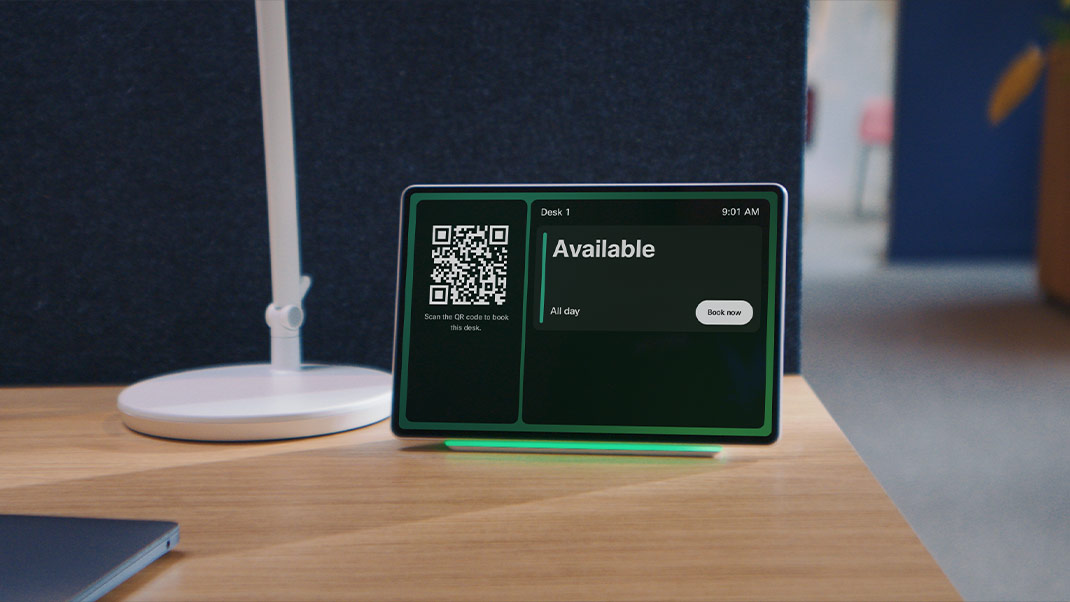
Create a consistent workplace experience by extending Cisco Room Navigator booking beyond the meeting room to the desk to create one consistent, intuitive experience across every workspace.

Create flexible, multi-purpose rooms that adapt to how teams meet. A streamlined AVoIP architecture and intelligent peripheral routing simplify deployment across meeting platforms—without custom programming or complex third-party AV.
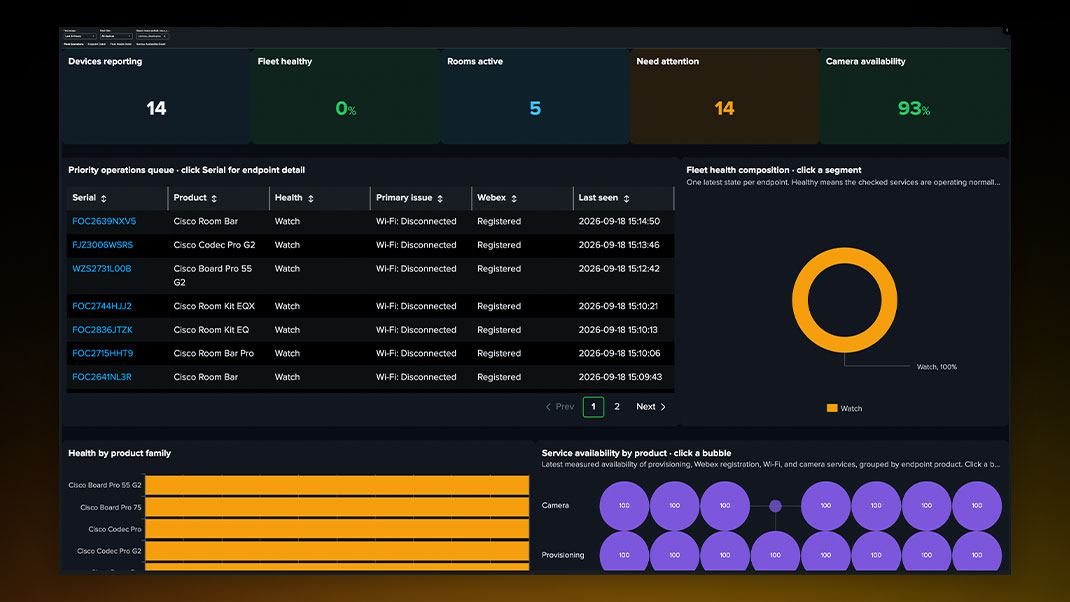
Cisco is making the workplace observable–on-premises or in the cloud. RoomOS telemetry can now flow directly into Splunk, giving IT a richer view of its collaboration environment alongside the rest of its technology estate.
Dialog
Dialog creates a continuous customer relationship by unifying customer and enterprise context, enabling long-horizon, multimodal, self-learning agents to orchestrate complex journeys.

AI Agent 360
AI Agent 360 is a complete governance function with robust security and observability tools to manage, monitor, and calibrate AI agent performance with confidence.

Webex AI Agent for Cisco CCX
Webex AI Agent expands to Cisco Contact Center Express, helping teams deliver autonomous and scripted self-service across voice and digital while maintaining control of an on-premises contact center.

AI Workforce Engagement Management
Webex AI Workforce Engagement Management (WEM) is the first native suite built for the agentic workforce—unifying workforce, quality, and performance management so you can plan, manage, and optimize every human and AI agent in one place.

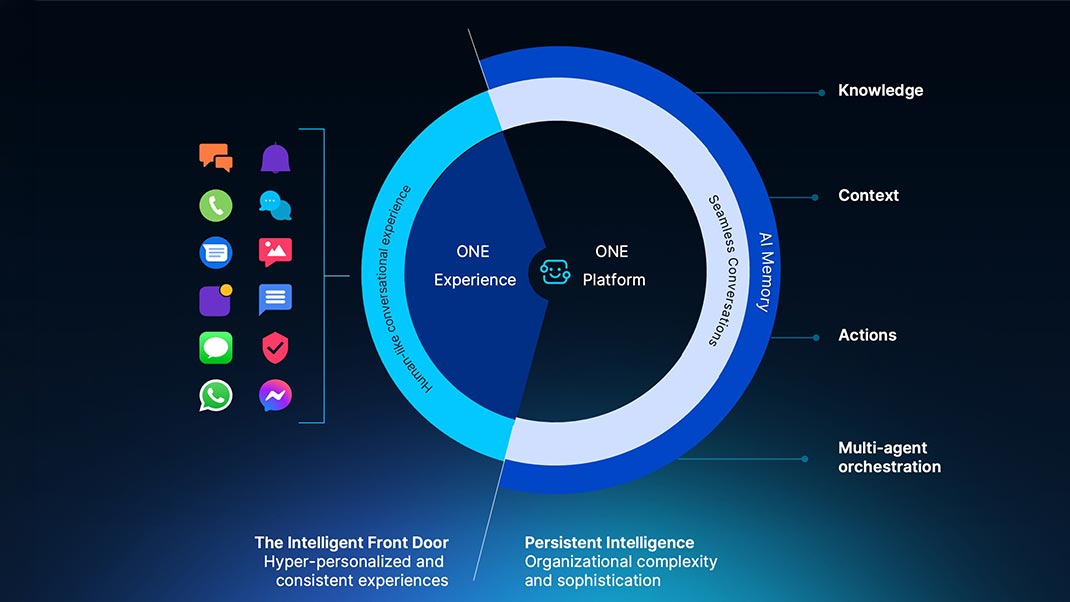
AI Concierge acts as a preconfigured, extensible AI agent that connects knowledge, enterprise systems, and other agents to support personalized conversations from first touch through resolution.
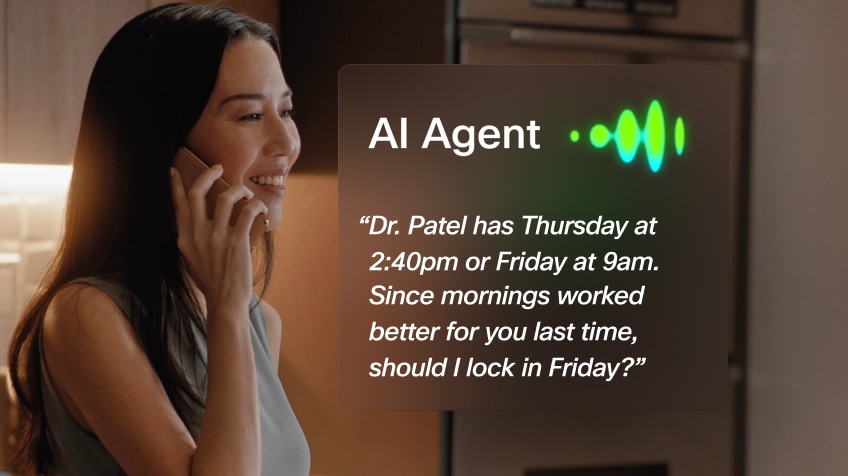
Prebuilt templates for patient authentication and appointment confirmations, plus enhanced EHR integrations such as Epic, help healthcare teams deploy precise, context-aware AI experiences faster.
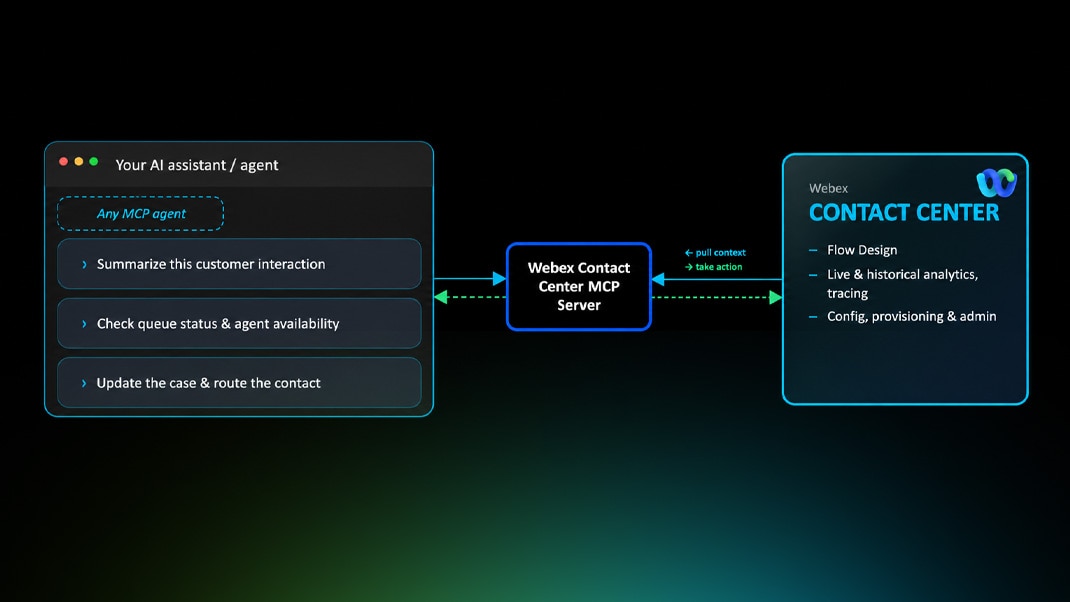
Embrace headless operations by orchestrating Webex Contact Center from any AI tool via MCP, enabling admins to use natural language to manage supported configuration, build and update flows, monitor operations in real time, and explore historical insights.
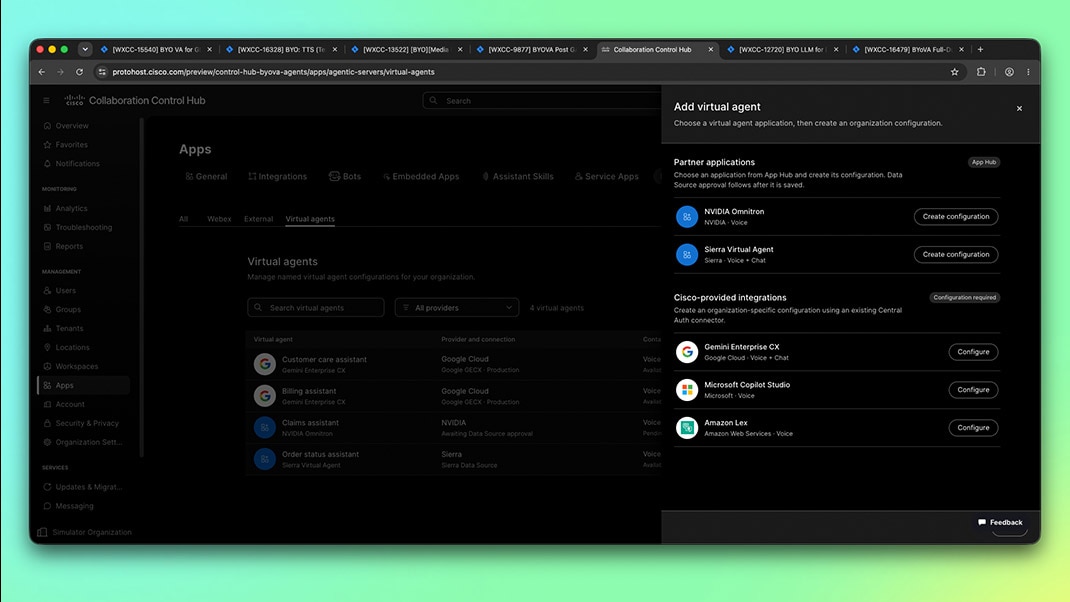
New integrations with NVIDIA, Google Cloud, and Amazon Nova Sonic expand the Webex CX ecosystem with enterprise-ready voice AI, personalized experiences, and more natural conversations.
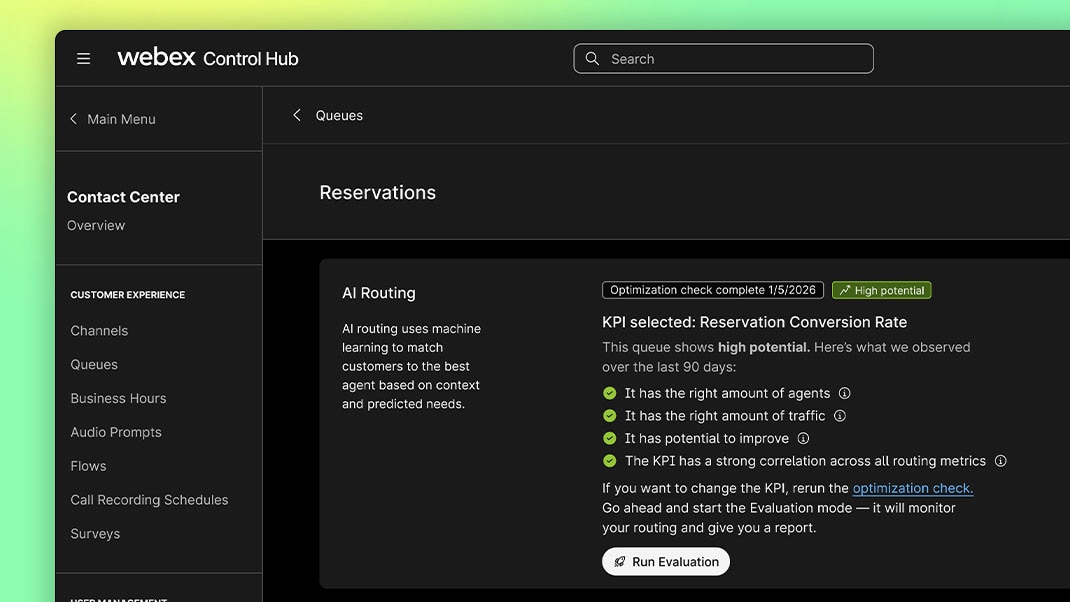
AI routing matches every customer to the best-suited agent in real time, using context, sentiment, and intelligence to personalize interactions and accelerate resolutions.

Universal Harness On-Premises simplifies AI orchestration with a single on-premises integration layer, unifying APIs, SDKs, and authentication so your teams can focus less on infrastructure and more on innovation.
This native CCaaS solution unifies voice and digital channels inside ServiceNow, streamlining agent workflows for faster resolutions and more personalized experiences.
The Cisco AI Assistant in Webex Contact Center equips agents with AI tools that offer automated guidance, context, suggested responses, and summaries to optimize customer interactions.
Cisco AI Assistant Real-Time Transcription allows agents to focus on the conversation by capturing details, supporting quick lookups, and streamlining handoffs all within a single transcript pane on the agent desktop.
Cisco AI Assistant Real-Time Assist (formerly Suggested Responses) and Wrap-Up Summaries provide real-time, contextual prompts and concise call recaps directly to the agent desktop, streamlining resolutions and reducing after-call work. Now available for on-premises contact center customers.
Webex Contact Center for Salesforce embeds enterprise-grade voice natively inside Salesforce, empowering agents to handle calls, access case data, and manage workflows in one unified workspace.
Mid-call summaries keep every agent informed, automatically capturing key details and sharing them instantly during consults and transfers.
Collaboration Control Hub and AI Canvas
Cisco is bringing Collaboration Control Hub and AI Canvas into Cisco Cloud Control, giving IT teams one destination to manage collaboration, networking, security, and observability. AI Canvas delivers cross-platform insights from Control Hub, ThousandEyes, and Meraki through natural-language queries, helping teams troubleshoot faster, identify root causes, and understand the next best action to speed resolution.
Agentic Experience in Control Hub
Control Hub’s agentic AI assistant helps IT admins query and compare configurations, troubleshoot issues, and assess the impact of changes using natural language.

AI Guardrails and Governance
Deploy AI with confidence. Control Hub gives administrators granular control over every AI feature, with automated PII protection and robust defenses against bias, jailbreaking, and data exposure.

AI Capabilities in Control Hub
Control Hub is your centralized command center for UCaaS and CCaaS—with powerful tools to select language models, customize AI features, enable workflow integrations, and measure AI adoption.

Smart Diagnostics
Smart diagnostics leverages AI to analyze device issues and suggest actions in an easy-to-digest format so your teams can proactively identify and resolve issues and successfully manage large device deployments—even with limited resources.

Increase productivity and get the most out of Webex with the AI Assistant for Control Hub. Simply ask “How do I...?” to get an instant, accurate answer, or say “Help me do...” to make lightning-fast configuration changes.
Admins can create license pools from a subscription and assign them to other organizations while maintaining full visibility into license usage. They can then dynamically adjust license allocations, optimizing distribution across organizations as needed.
With this visual of SIP signaling exchanges between endpoints, admins can quickly identify and resolve call connectivity issues, drops, and signaling problems.


Additional features, storage, and support start at just one low price.


